Redesigning impact reporting so Explorers feel supported, not burdened.
I had a very good summer being taught by people who are much better at this than I am.
Ten weeks at the National Geographic Society, mostly spent finding out how much of design is getting a room to agree.
01Context
I was a UX Design intern at the National Geographic Society.
02Problem
NatGeo needed a way to measure the impact they make to communicate with donors.
All within the platform Explorers already use, the Explorer Home.
The internal NGS home for explorers! Contains a directory, resources for their grant, and more.
03Research
I talked to the Explorers filling the form out, and to the team who had to read it.
The Explorers Festival put the people who fill this form out in one room for a week, so that is where the research happened.
Three things came up that the form itself could not fix.
Numbers on their own were not what they wanted to send.
Explorers did not want to share only quantitative metrics, and sometimes did not want to share the qualitative ones either, even where they were required to.
They wanted to reach other Explorers.
Those are the people who can actually help with the work, and the Society had already started building community around exactly that.
The brand was keeping them quiet.
There had been Explorer blogs, and Explorers told me they did not post for fear of not meeting the standard.
The complaints about the form itself are in the next room, against what the business team needed from it.
04Project 1: Deliverables
Reimagine how Explorers report their project impact through the platform they already use, the Explorer Home.
Near-Term Prototype
- to ship in a quarter
Future Vision Concept
- go wild!
Even for the near-term prototype, they told me to push the boundaries and not go for something fully feasible. This was an exploration into “what could be” to rally important stakeholders.
05The process
Is it just the form being ugly that was causing issues? No. The Explorer's main complaints also clashed with what the business team needed.
I led brainstorming with all of the key stakeholders, to gather their opinions, start aligning people on an idea, and learn what they needed.
Explorer complaints
Business team needs
The form was too long — 13 metric topics, each with multiple fill-ins.
They needed all 13 metrics with long, specific descriptions.
Explorers insisted they couldn't fill it out until they had all their data.
They needed whatever data was available as soon as possible.
It was repetitive and tedious to fill out the form multiple times.
They needed accurate, ongoing updates as new results emerged.
Both sides were reasonable. The design problem was finding something that worked for both.
The number of indicators couldn't change. Reporting frequency couldn't change. The solution had to work within those boundaries.
06The reframe
What if we changed this flow by using a different mental model — like a database?
This isn't a form. It's an active record Explorers return to throughout their grant.
Changing the mental model changed everything downstream. Instead of complete and submit, the experience becomes open, add what you have, come back when there's more. Partial data stops feeling like failure.
Current flow
01 — read all thirteen indicators
02 — fill-ins, on a separate page
03 — submit the form
new data arrives → the entire process again, from scratch
reframed as a database
Proposed flow
01 — open the page, fill in the indicators that apply
02 — save, and come back when there is more
I worked within the design system and contributed new local components.
07Design
Integrating reporting into Explorer Home as a page Explorers can update at any time.
The near-term solution brings impact reporting into Explorer Home as a persistent page, not a form flow. Explorers already live in Explorer Home for grant resources and communications, so the reporting sits where the work already is.
Empty state, entered from home
Explorers enter through an announcement or alert on their homepage.
The entry flow
Clicking the announcement navigates to the impact reporting page.
Grant details and the form
Grant details are embedded via Salesforce, and all indicators live on one persistent page — expand any to fill in fields.
Save and return at any time
Save at any time, return and update at any time, with no resubmission required.
Update state, from a reminder
A milestone reminder surfaces an inline form directly on the homepage.
A quick update in place
A sticky bar on the right that follows the user, giving them a point of contact and a reminder they can always save first.
08Future concept
Giving inherent value to updating your metrics by making them public-facing.
Even if the form became more intuitive, there was still the issue that explorers didn’t want to share just quantitative metrics. Sometimes they didn’t even want to share the qualitative ones, even if they were required to.
This concept was exploring what would give value to the explorer as well, and make them want to share. NatGeo had already been working on the explorer community, because a lot of explorers wanted to be able to talk to other explorers — those are the people who can help them with their work.
So I thought of a concept where explorers can build their own web page as part of the Explorer community, to share their work with other explorers while also sharing the information NatGeo needs.
A public page per Explorer
Each Explorer gets a grant webpage that surfaces their metrics and connects them with the broader Explorer community, so keeping the work current has a motive beyond compliance.
Edited like a website
With a website editor-style interface, Explorers can manage and add data to their webpage.
Aligning design with business
Neither concept was scoped to ship immediately; the goal was to show stakeholders what the platform could become and make the case for investing in design.
NatGeo's brand was so big that Explorers were afraid to post.
There used to be Explorer blogs, a place to put yourself out there. Explorers told me they didn't post, for fear of not hitting the brand standard.
Feature spotlight
Reducing brand pressure
An AI writing assistant helps Explorers meet NatGeo's editorial standards, removing the friction of a brand people felt intimidated by.
09Outcome
I presented my solution to stakeholders including the business team, the director of PMs, the design manager, and other leadership. I walked through my full design process, my reasoning, and my usage of AI in the process.
The final designs were presented to the business team, the director of PMs, the design manager, and senior leadership. The presentation covered the full process: research, reframe, near-term design, and future vision, including a discussion of where Explorer Home's community features could go.
The project was scoped as a design exploration to inform future roadmap investment. Things don't always ship, but they can still shape what comes next.
10Project 2: AI-assisted component handoff
I built an agent before agents were a thing: a chat that answers the component questions a designer was answering by hand.
The rules that were missing weren't the deterministic ones.
I started on guidelines with the designer and the PM leading the project. Listening to them and asking deeper questions turned up the real gap: the designer had combinations that worked better in one scenario than in another, and no way to hand that judgement over. A rules document cannot hold it.
NGS had just brought Gemini in, which gave the idea somewhere to live.
AI is good at taking spaghetti and putting it in a bento box. Given the right documents it can hold the deterministic rules and the subjective ones at the same time.
Two sets of documents.
The deterministic rules written down as rules, and what-if documents that captured the designer's subjective feedback — the combinations she wished she could impart.
A chat anyone can stand up.
The documents are the knowledge base for a Gemini gem, so a writer with a question asks the chat instead of the designer, and anyone who wants their own can build one.
Evals, before evals were a thing.
I scored the generations against my own rubrics and tuned the chat's prompt until they held.
Onboarding, because most people had never used AI.
I wrote the setup guides — one for the designer maintaining the knowledge base, one for the writers using it — and user tested them to make sure they were clear.
I learned how to design an agent before agents were a thing, which turned out to be useful for everything I have worked on since.
11Side projects
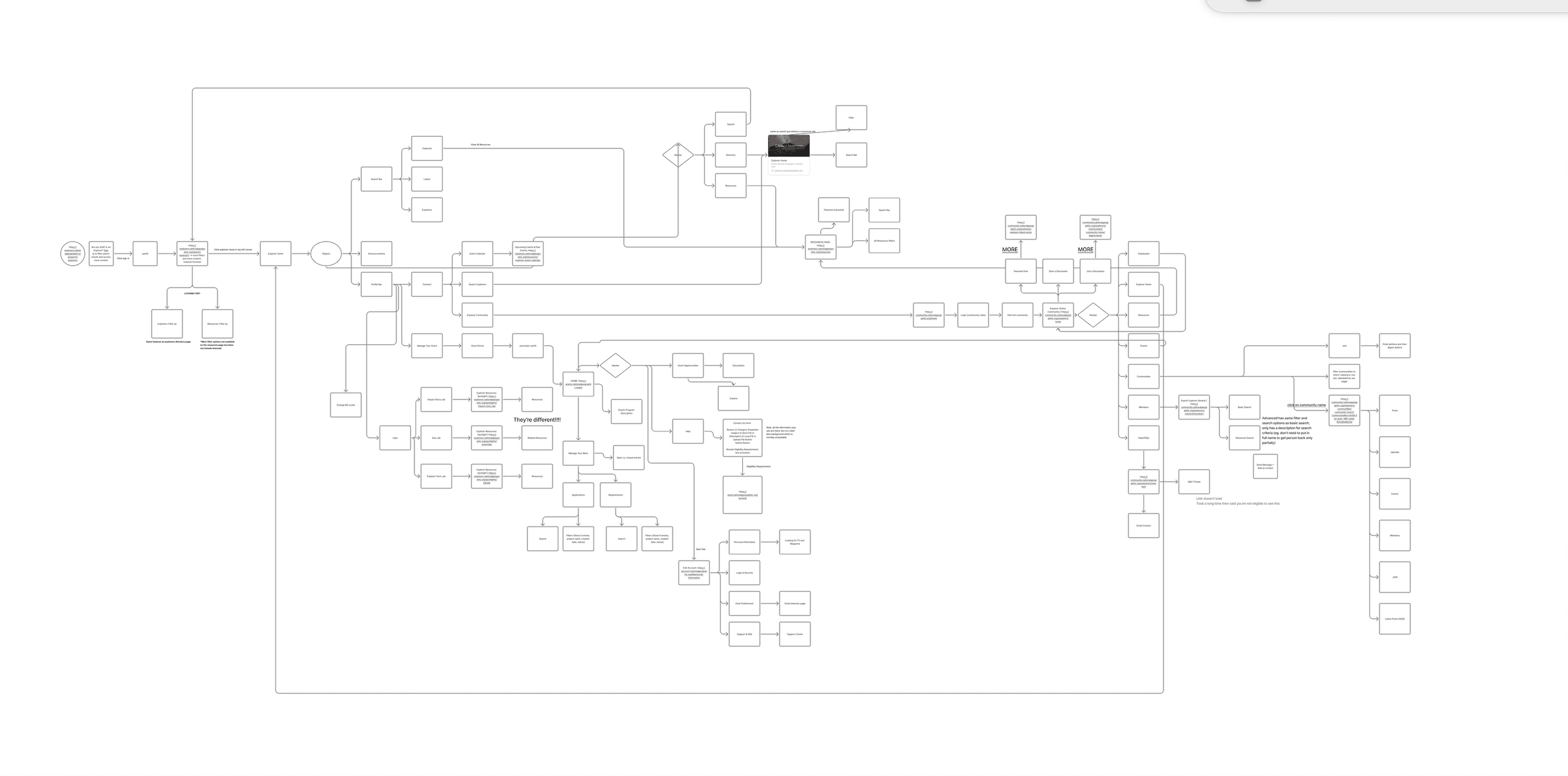
Alongside the main brief I took on information architecture work, ran user testing in Maze, and explored what Figma Make could do for design ops.
12Learnings
What I took from working inside somebody else's organisation.
Loop in stakeholders regularly to maintain confidence and buy-in for your designs
Prototypes are incredibly effective in rallying stakeholders and pushing future visions
Understand the needs and frustrations of ALL of your stakeholders to create a comprehensive solution (business, design, end-user, development, management etc.)